
As an amateur photograper, I’ve been amazed at the changes in technology that have occurred during my days. The biggest of these advances has been the transition from film to digital photography.
One of the advantages is the ability to go back to digital photos and change various parameters from exposure to white balance to HDR (high dynamic range) to brighten the shadows and dim the bright areas.
These capabilities are even enabled in our cell phone cameras, where we’re all becoming creative at the click of a button. I wrote about that before – whether these tools make us creative, or just able to click on a pre-set.
Now, with our cell phones, as well as some software programs, we can use a feature like “Magic Eraser” to get rid of the things we don’t want in our photos. AI (artificial intelligence) is enabling even more. I want to talk about that a bit – how it’s a good thing, and where I’ve been a little leery as a creative photographer.
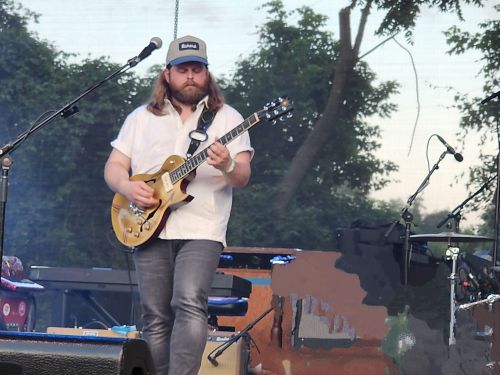
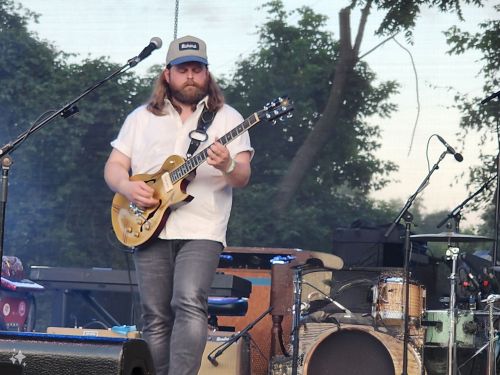
First, let’s start with this photo from my cell phone. It’s obviously a concert setting, and someone’s hand is in the way:

I opened that same photo in Google Photos and used “Magic Eraser” to remove the hand. As you can see, a rough attempt was made to remove the hand, but the new background is all fuzzy and not really a picture of anything at all. Just texture:
Then, I opened the photo in Samsung’s Gallery. Samsung has added AI capabilities to its newer phones. Something called “AI Generate.” I took the original photo, highlighted the fuzzy hand, clicked on “generate,” and voila! It created a drum kit! I about jumped out of my chair! Now, it’s not an exact recreation of what’s in the background (the side of a piano is cut off), but it at least looks like something. I decided to try some other photos.
Original photo. I didn’t like the “band only” sign in the corner.

I edited it with “Magic Eraser.” Notice the corner of the yellow sign bleeds into the background.

Next, “AI Generate” by Samsung. Notice that it has created an actual corner for the sign.
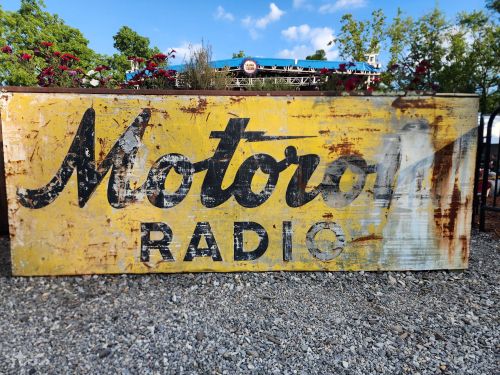
Now we’re getting somewhere in terms of a good use of AI. There’s no chance someone would look at this and say, “Hey, what happened to the corner of the sign?”
Next example, this barn with some distracting machinery strewn about.

Here’s the edit with “Magic Eraser.” If you look closely around the eaves of the barn at the left, it looks fake, even choppy like repeated pixels. Which is exactly what it is.
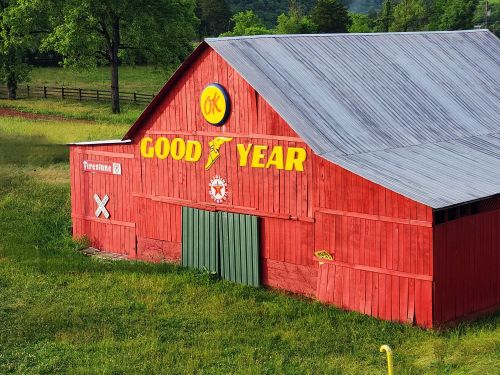
Here’s a zoom of that edited photo. You can clearly see the fuzziness around the roof and side of the barn as well as the pixelation in the grass.

Here’s the same photo, edited with “AI Generate” by Samsung. As you can see, the barn and the grass look better and much more realistic.

These examples displayed above are utilizing AI at its best. My edits are not making substantial changes to the original photo. I feel like the final photos of the Motorola sign and the barn are “my photos.” I’ve simply “retouched” them, removing elements I didn’t want, much as a portraitist would airbrush blemishes.
Then I got bold…
I decided to take another of my photos and see what would happen. This next picture was taken from behind my house, overlooking the valley. Thanks to one of my neighbors clear-cutting his forested area for lumber, I now have this great view. But I really wondered what would happen if I tried to remove the large, dead tree on the left. So, I encircled it in Samsung Gallery and clicked “generate.”
The results surprised me.
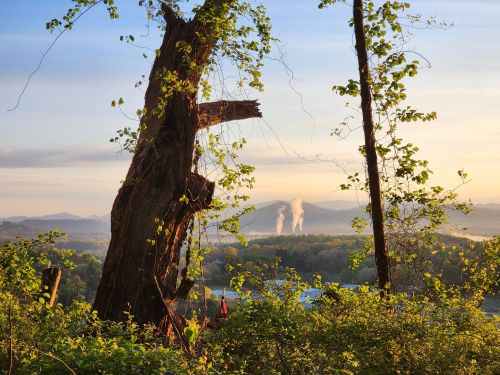
This shocked me. Using artificial intelligence, the software removed the big, wide stump and generated two smaller trees, using some of the existing foliage and mimicking the tree on the right. Then, seeing those white building roofs at the bottom, and not thinking them buildings, AI generated a river in the background!
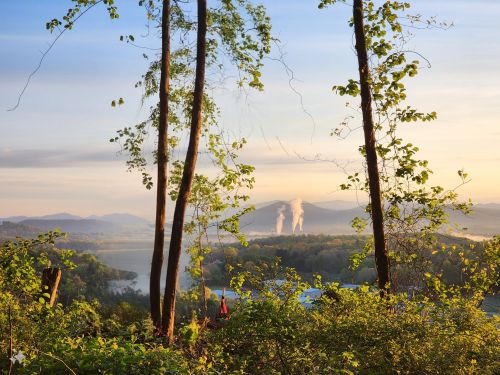
Now, there’s a part of me that likes the second photo. Maybe even better than the original. I kinda wish the real scene had those two small trees instead of the one big one. But, here’s where my concern lies…
It’s not my photo.
Maybe I’m more of a realist photographer. When I go into Lightroom to “fix” my digital photos, I don’t want to do too much. I want to make my photos (usually scenics) look as close to what I saw with my own eyes. I might bump the contrast some for effect or boost the color a little. But when I see a photo reproduced with highly saturated color (such as you often see in post cards), I cringe.
It’s easy to pick out AI when a subject has 6 fingers or some other anomaly. But in that last example, would anyone suspect that it had AI-generated features? Probably not.
I’ve seen numerous examples posted to social media that immediately aroused suspicion. Something about those storm clouds above the Tetons looks off. That picture labeled as a “View from Beartooth Gap” brought immediate rebuke from myself and the many others who’ve actually driven Beartooth Gap and know what it looks like. How many of us ooh-ed and ah-ed over a recent eclipse photo allegedly taken from the window of an airliner, when the eclipse occurred almost directly overhead?
We need to be on our toes. In the realm of the arts, AI is becoming more and more a question, as “paintings,” photos, writings, and even songs are being created by no human author. And yet, AI borrows from existing artists for styles and sounds and textures. There’s an ethical question here.
I wish I had answers. Technology is moving so fast that this post will be out of date in a month. I do know that with my own photography, I’m going to be as careful as possible to make sure that my art…is mine.
 ordo salutis